

How to remove harshness from vocals on iPad and iPhone
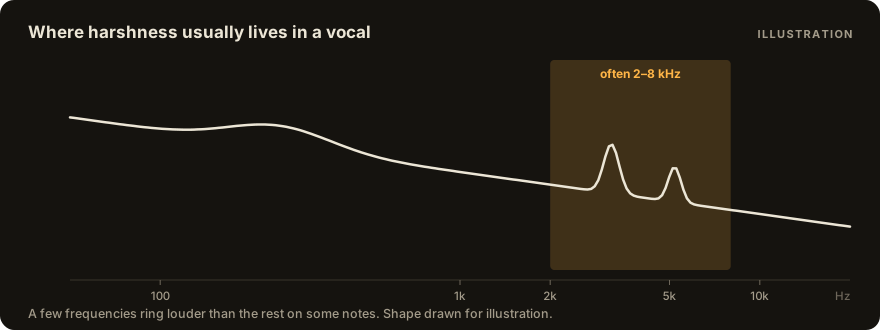
Harshness in a vocal is usually a few frequencies, often somewhere between 2 and 8 kHz, that ring louder than the rest on some notes. On iPad and iPhone you can tame them in three ways, in any AUv3 host (GarageBand, Logic Pro for iPad, AUM, Loopy Pro, Cubasis):
- A narrow EQ cut, when the harsh frequency is always the same (a mic or a room).
- A de-esser, when the harshness is on "s", "sh" and "t" sounds.
- A dynamic EQ or a resonance suppressor, when the ringing moves with the notes. These cut only while a frequency rings.
Start at the source if you can still record: back off the mic a little on loud notes and angle it slightly off the mouth. A plug-in can calm a harsh take, but a take that wasn't harsh in the first place always sounds more natural.
1. Find it
Loop the harshest phrase. Put a parametric EQ on the vocal, boost a narrow band (+8 dB, high Q) and sweep it slowly from 2 to 8 kHz until the harshness jumps out at you. Then turn that boost into a cut instead, by 2–4 dB.
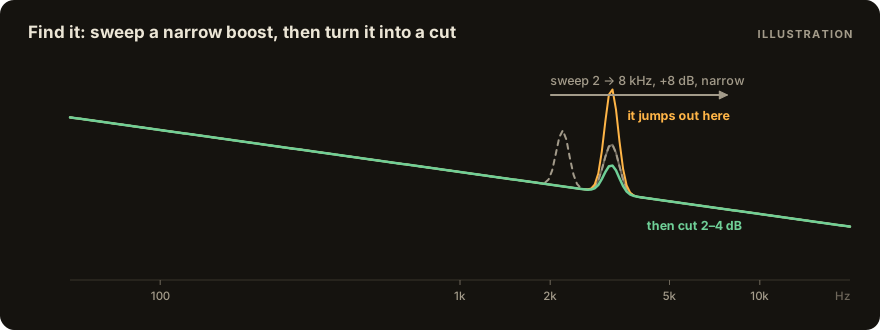
Play the whole vocal back with the cut in. If the harshness is gone everywhere, you're done: the problem was a fixed frequency, usually the mic, the room or the singer's voice in that register. If it comes back on other notes, at a different frequency, a static cut won't hold. Making it deeper only dulls the notes that were fine. Go to step 3.
2. Sibilance is a separate problem
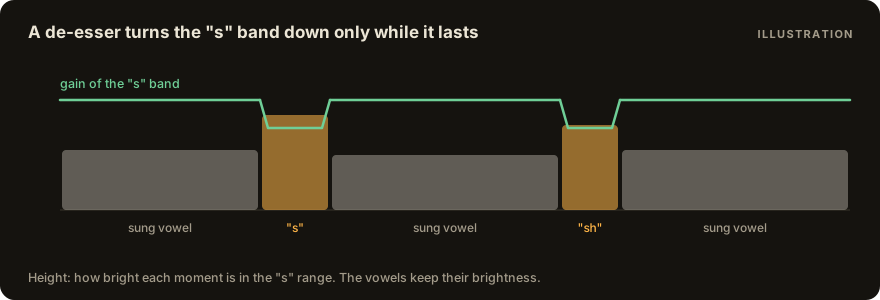
If the harsh moments are the "s", "sh" and "t" sounds rather than sung notes, you need a de-esser, not an EQ. A de-esser turns down that band only while the consonant lasts, so the vowels keep their brightness.
- Free: Techivation T-De-Esser 2.
- Paid: FabFilter Pro-DS, TB Sibalance, Klevgrand Esspresso.
- Built in: Logic Pro's DeEsser 2, if you mix in Logic Pro for iPad.
De-ess before you add brightness or "air" later in the chain, so the lift doesn't make the "s" sounds bite again. How to add air without harshness covers that step.
3. Moving resonances: dynamic EQ or a resonance suppressor
When the ringing moves from note to note, you want a cut that only happens while a frequency rings, and only as much as it needs.
A dynamic EQ cuts a band you choose only when it gets loud: FabFilter Pro-Q 4's dynamic bands and TB Equalizer do this. It is the precise, manual route: you find each band yourself and set its threshold.
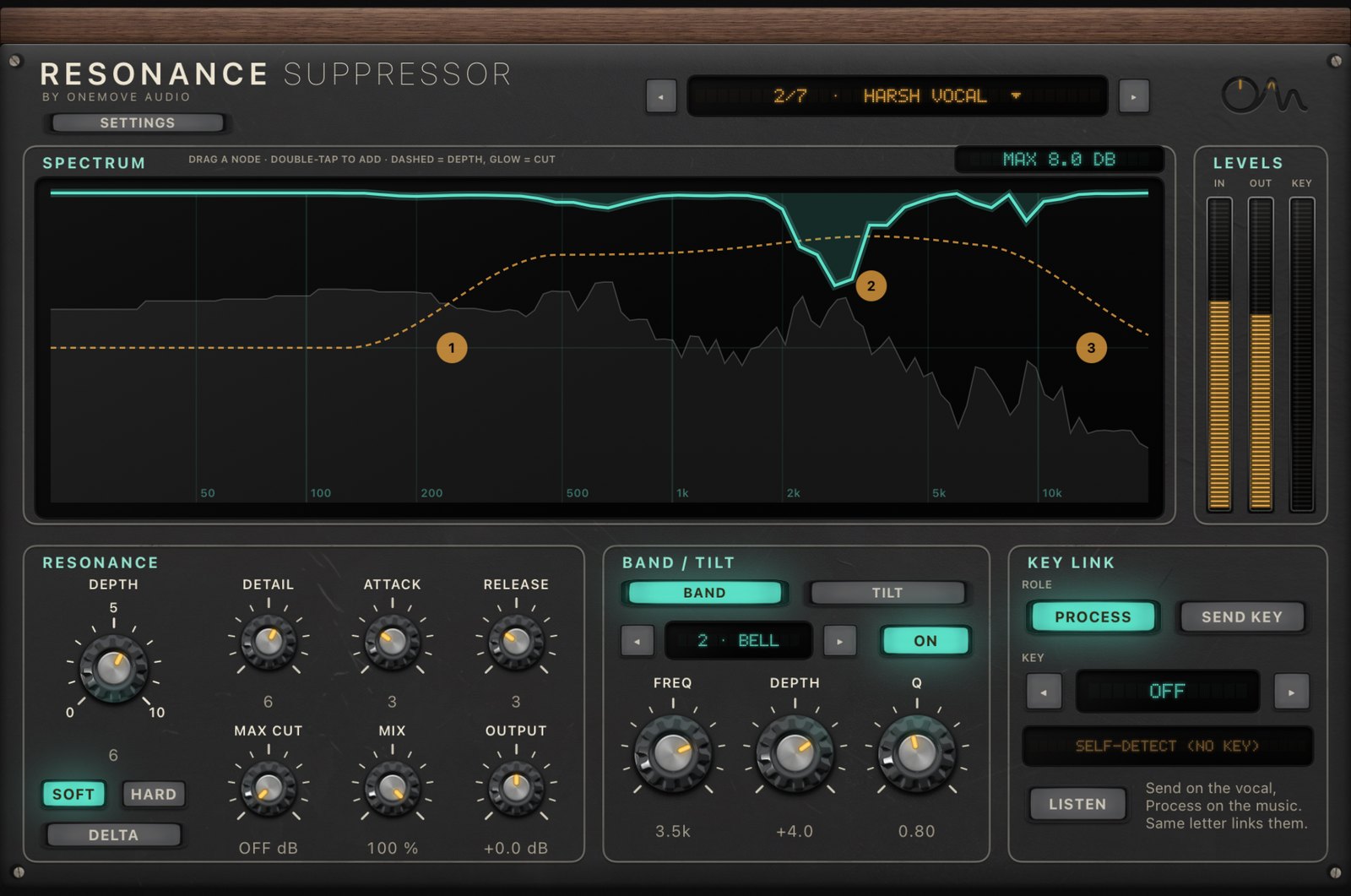
A resonance suppressor finds the ringing bands by itself, moment by moment. On desktop that's the soothe category. There's no soothe on iOS. On iPad and iPhone, OneMove Resonance (in OneMove Resonance & Balance) does this job. We make it, so weigh this accordingly. It is for the same job as soothe, not a clone: our side-by-side with settings and audio shows where the two differ. It reports zero latency to the host, so you can sing through it live, and its DSP uses 2.1 % of one core on an iPad Air M3. Resogear, a resonance suppressor from another developer, is in TestFlight.
Whichever you use, start gentle and compare with the plug-in off at matched loudness. A suppressor that's working too hard makes a voice dull, and a dull voice can sound "smoother" at first simply because it's quieter.
4. Check in the mix
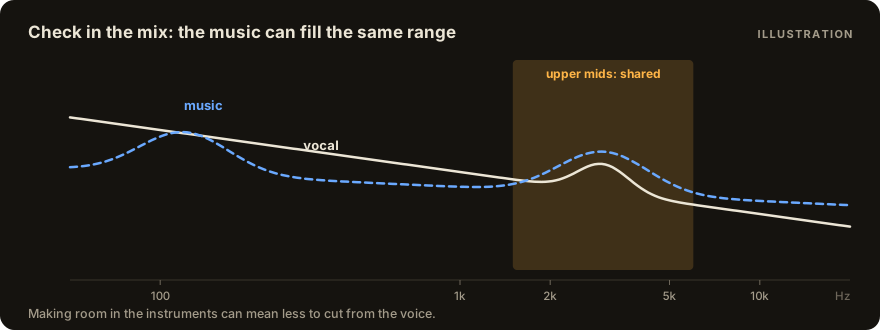
Harshness heard solo can vanish under the music, and the other way round: a vocal that's fine on its own can turn piercing once guitars or synths fill the same range. Make the final call with the beat playing, at the volume you'll actually listen at. If the vocal only sounds harsh against the music, the fix may be on the music instead: making room in the instruments' upper mids lets you cut less from the voice.
A starting chain
| order | job | what to use |
|---|---|---|
| 1 | fixed harsh frequency | a narrow EQ cut, 2–4 dB |
| 2 | moving resonances | a dynamic EQ or a resonance suppressor, gentle |
| 3 | compression | your usual compressor |
| 4 | sibilance | a de-esser |
| 5 | brightness | an air or shelf EQ, last |
The order of the rest of the chain is in what order vocal plug-ins should go in.
Questions
Is there a soothe-style plug-in for iPad?
There's no soothe on iOS. OneMove Resonance (AUv3, iPad and iPhone) is a dynamic resonance suppressor for the same job. It isn't a clone, and our side-by-side with settings and audio is on the comparison page. FabFilter Pro-Q 4's dynamic bands are the manual route.
Can I fix harshness in GarageBand on iPhone?
Yes. GarageBand's built-in EQ handles a fixed harsh frequency, and you can load AUv3 effects on a track for de-essing or dynamic control.
Does a resonance suppressor add latency?
Some use look-ahead. OneMove Resonance reports zero latency, so you can sing through it.
Can I try OneMove Resonance before buying?
Yes, without a time limit: free download. Every feature works; each plug-in processes for 5 minutes per load, then passes your audio through until you reload it. Exports stay unprocessed until you unlock. Unlock once: Resonance $7.99, Balance $7.99, or both $11.99 (US prices); no subscription.
soothe is a trademark of oeksound Oy. FabFilter, Pro-Q and Pro-DS are trademarks of FabFilter. Logic Pro and GarageBand are trademarks of Apple Inc. T-De-Esser, TB Sibalance, TB Equalizer, Esspresso, AUM, Loopy Pro, Cubasis and Resogear are products of their developers. Products are named only to describe categories of tool. OneMove Audio is not affiliated with or endorsed by these companies.