
OneMove Vocal Console
OneMove Vocal Console is a complete vocal chain in one AUv3 plug-in for iPad and iPhone, by OneMove Audio. Fourteen modules take a voice from a raw take to a finished vocal: noise reduction, pitch correction, EQ, compression, colour, air, loudness and space. Every module starts as one knob.
Try it free on the App StoreRead the specs
How is it organised?
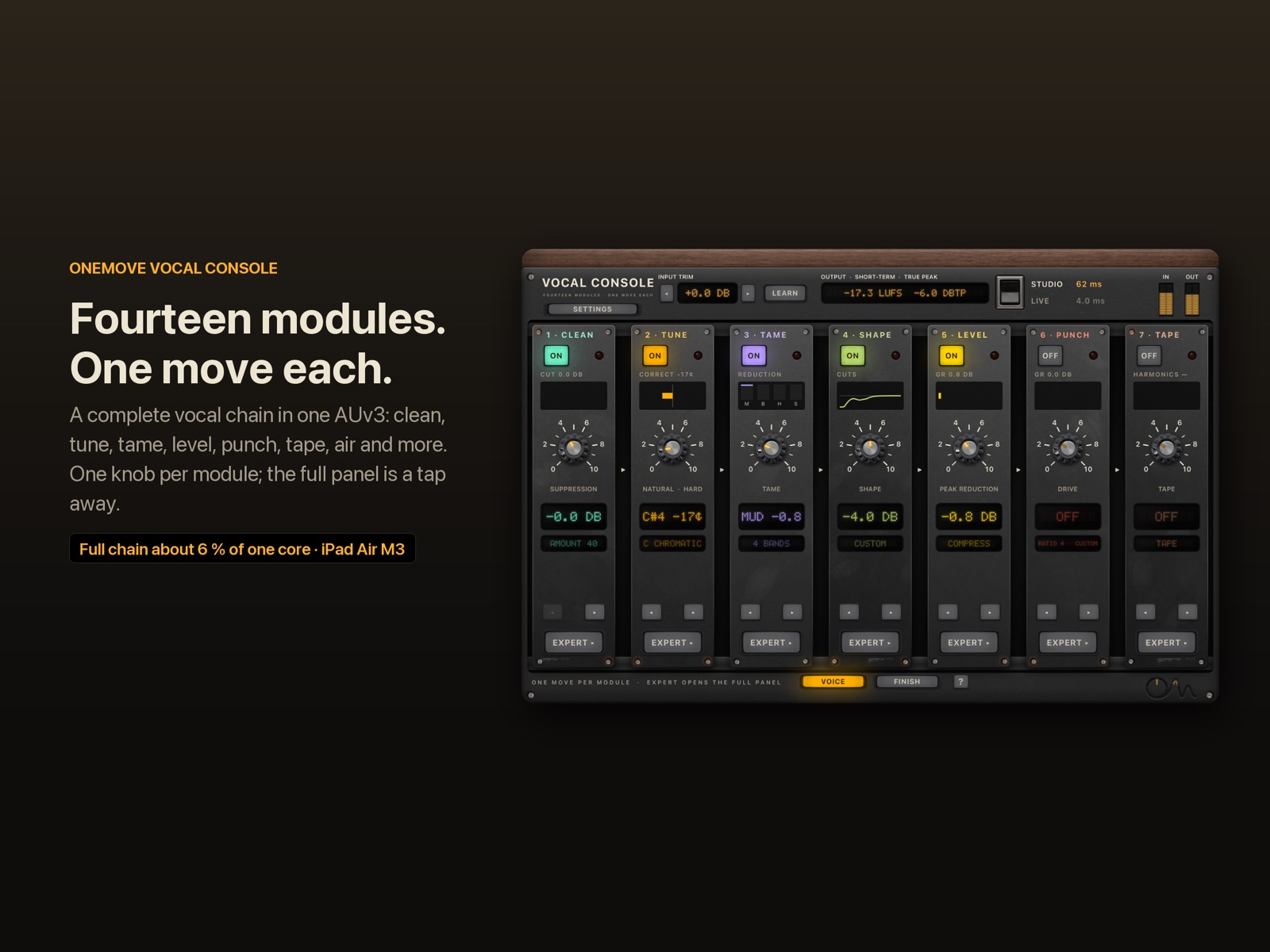
The plug-in opens on One Move: one column per module, in signal order, across two pages.
- Voice page: Clean → Tune → Tame → Shape → Level → Punch → Tape.
- Finish page: Floor → Ride → Tube → Character → Air → Loud → Finish.
That order follows a classic studio lead-vocal chain: correct and control first, the opto before the FET, ride the compressed voice, change its character late, then air, loudness and the final tone. You can move any column with ◂ ▸.
Each column has a power lamp, a one-line description, one big knob, a live read-out and an Expert ▸ key. Expert opens that module's full panel, with every control and its meters. ◂ One Move in the header goes back.
- The knob is a macro. Turning it sets several Expert controls at once, the way an engineer would move them together. The module pages list what each knob moves.
- Expert edits are kept. If you change a control in Expert, the column shows CUSTOM. Saving and reloading a session never lets the knob overwrite your edits.
- Everything automates. All 207 controls are host parameters, including each module's knob.
What does Studio vs Live mean?
One switch in the header picks the engine for the whole chain. Its latency badge shows what the host is told.
| Studio | Live | |
|---|---|---|
| Made for | mixing a recorded vocal | singing through it while you track or perform |
| Noise reduction (Clean) | neural (default) or classic spectral | spectral (default), zero-latency, or Neural 0 ms |
| Pitch correction (Tune) | 20 ms of look-ahead for clean splices | 0.67 ms |
| Last stage | true-peak limiter with 1 ms look-ahead | a soft safety clipper with no look-ahead |
| Plug-in latency at 48 kHz | 61.6 ms (neural) or 32.3 ms (classic), compensated by the host | 4.0 ms (spectral) or 1.3 ms (zero-latency, Neural 0 ms) |
| Full chain CPU, iPad Air M3* | 5.7 % (classic) of one core | 5.2 % (spectral) of one core |
\* CPU measured before Space was added; Space adds about 0.3–0.4 % of one core on the Mac.
These are the plug-in's own delays. Round-trip latency also includes your host's buffer and your audio interface. The switch fades over a few milliseconds, so it never clicks. More in latency explained.
Gain staging in one place
- Input trim (±24 dB, 0.5 dB steps) is the first thing in the chain.
- LEARN listens to six seconds of singing and sets the trim so the voice sits at −18 dBFS RMS, the level the modules' thresholds are designed around.
- Output shows short-term loudness (LUFS) and true peak (dBTP), and the Studio limiter's gain reduction when it works.
- Lamps: each column's small lamp lights amber when its module works hard and red when it is pushed too far, so you can see which module to back off.
Try it without a host
The app has its own console. Pick one of two demo vocals, or your microphone with headphones, and the whole chain runs live with an A/B bypass and the chain presets. The demo vocals are short a cappellas licensed under Creative Commons (credits); they never use up the free demo time.
Hear the chain presets
Studio Lead chain
A dry male vocal with an added fan and clicks, then the Studio Lead chain: two compressors, tape, tube, air, tone and a plate with a light double. Before and after are set to the same loudness, so you hear the change, not a level jump.
"More Than 2 Sides (accapella)" by Colin Mutchler (ccmixter.org/files/commonsplice/2599), licensed CC BY 2.5 (creativecommons.org/licenses/by/2.5). Excerpt, processed by OneMove Vocal Console.
R&B Smooth chain
The R&B Smooth chain on a female vocal with an added fan and clicks: smooth levelling, softer top end, plate and doubler. Before and after are set to the same loudness, so you hear the change, not a level jump.
"Lost_Pella" by queeniemusic (ccmixter.org/files/queeniemusic/65508), licensed CC BY 3.0 (creativecommons.org/licenses/by/3.0). Excerpt, processed by OneMove Vocal Console.
How do the free demo and the unlock work?
Free to try, then $19.99 once
- Every module works in the demo: nothing is locked or hidden.
- 5 minutes of real-time processing each time the plug-in loads. Reload it for another 5 minutes.
- Bounces and exports pass through unprocessed until you unlock.
- One in-app purchase of $19.99 unlocks the full version for iPad and iPhone. No subscription.
The unlock is an in-app purchase handled by Apple. It covers the plug-in in every host and the app's own console on your devices.
Key Link: side-chain in any host
The rider (Ride) can follow the music, pulling the vocal up in loud passages and down in quiet ones. Hosts that route a side-chain to AUv3 effects feed it directly. Hosts that don't, such as Loopy Pro, can use Key Link: one instance of the plug-in sends audio on a link channel (A–H) and another receives it, sample-aligned. See hosts and setup.
FAQ
Does OneMove Vocal Console work on iPhone?
Yes. It is a universal AUv3: on iPhone the One Move page shows two modules at a time with knobs sized for your thumb, and every Expert panel has a phone layout.
Can I use only some of the modules?
Yes. Every module has its own power lamp, and a module that is switched off costs almost nothing. The latency stays the same, so switching modules never moves the vocal in time.
Which sample rates does it support?
44.1, 48, 88.2 and 96 kHz, including the neural noise reduction. Processing is 32-bit floating point throughout.
Does it need an internet connection?
No. All processing, including the neural noise reduction, runs on the device. The site and the app collect no data; see privacy.