



OneMove Master is mastering for iPad and iPhone. Pick a loudness target and play the loudest part of your song: Master learns it for 12 seconds, sets the gain so the song lands on the target, then holds still. Four characters, a true-peak ceiling and a level-matched Compare. Free download with a 5-minute demo per load; unlock once for $14.99.
Available on the App Store Version 1.0 is on the App Store. Free download with a 5-minute demo per load; unlock once for $14.99 (US).
- StatusAvailable on the App Store
- FormatAUv3 Music Effect and app for iPad and iPhone
- DevicesiPad and iPhone
- PriceFree download with a 5-minute demo per load; unlock once for $14.99 (US)
- Release date21 November 2026
- Get it on the App Store
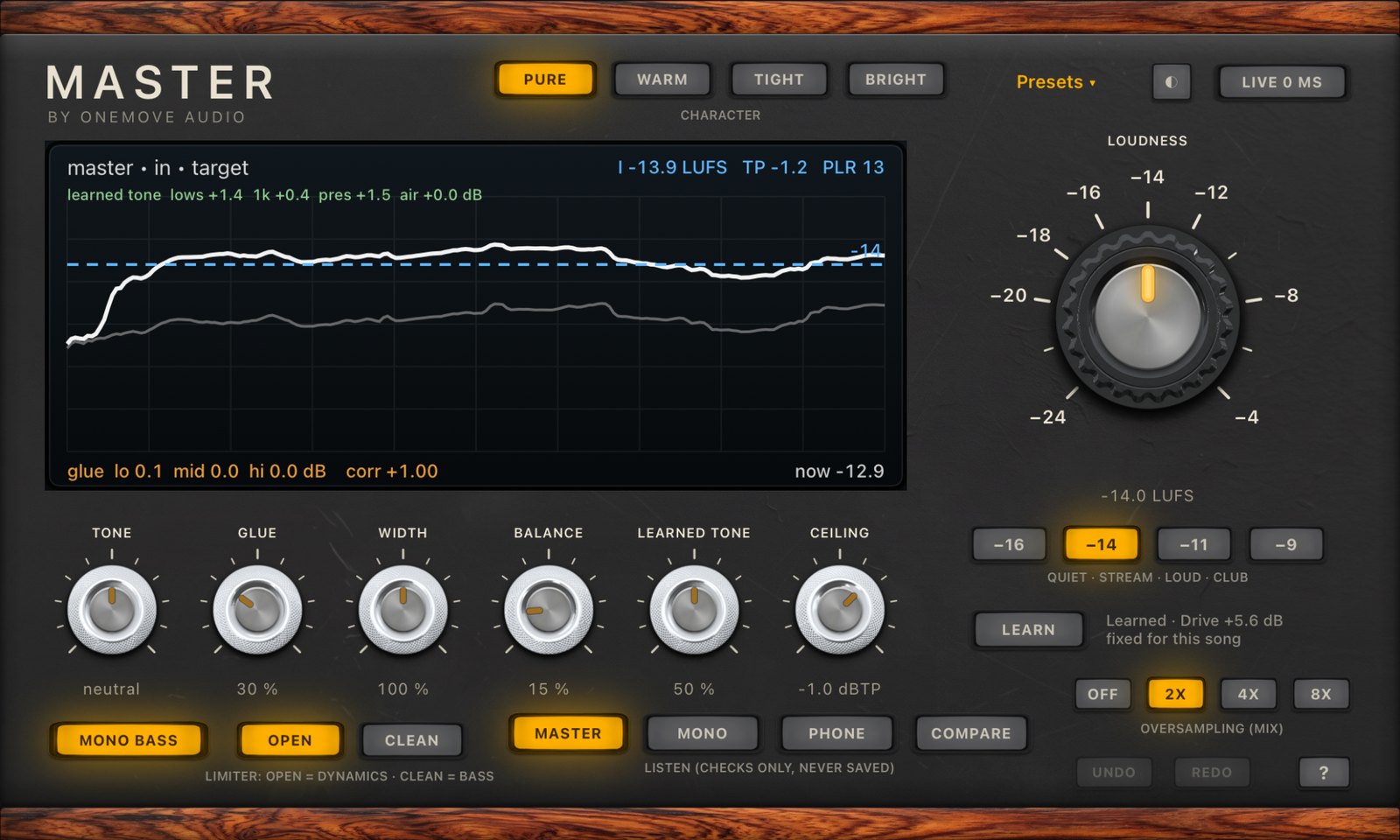
What it does
Streaming services play every song at about the same loudness, so a master that is too quiet sounds weak next to others, and one that is pushed too hard gets turned down and loses its punch. OneMove Master takes a finished stereo mix to the loudness you choose, keeps the peaks under a true-peak ceiling, and gives it a finishing tone. It's a finishing tool, not a repair tool: the mix still matters most.
How it works
- Put it last on your master or main output, in any AUv3 host on iPad or iPhone.
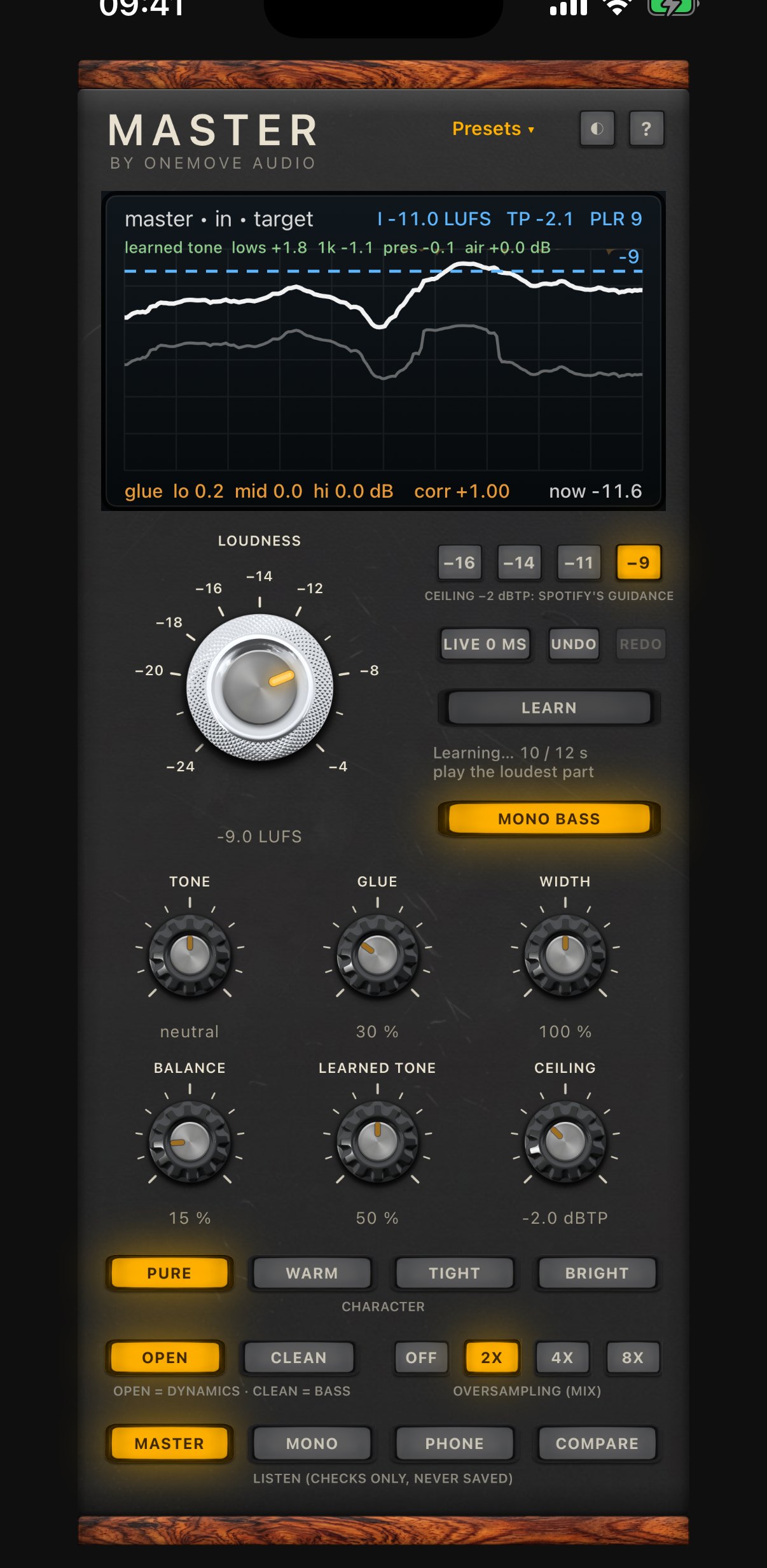
- Pick a target: the big knob, or one tap on the quiet, streaming, loud and club chips.
- Play the loudest part of the song. Master learns it for 12 seconds, sets the gain so the song lands on the target, then holds still. It doesn't ride your song: verses stay quieter than choruses, as you mixed them.
Compare then plays your unmastered mix at the master's loudness, so you hear what Master did to the sound, not just that it got louder.
The controls in brief
- Loudness: the target, in LUFS. Turning it changes how hard the limiter works, never your character or preset.
- Learn: learns again, after a big change or on another song.
- Character: Pure (clean, EQ only), Warm, Tight and Bright, all level-matched, so switching changes the sound, not the volume.
- Learned tone: while it learns, Master compares your mix with released masters in four regions (lows, middle, presence, air) and corrects part of the difference. 0 % switches it off.
- Tone, Glue, Width, Balance: a gentle tilt, three-band glue, width with mono bass, and a moment-by-moment balance.
- Ceiling: the true-peak limit. Louder than −14 it follows Spotify's guidance and defaults to −2 dBTP.
- Live or Mix: zero latency to play or sing through it, or look-ahead and true-peak safety for mixing and bouncing.
- Mono, Phone, Compare: listening checks, never saved and never bounced. Undo and Redo for every change.
Each one, with its picture, range and default, is in the manual.
Master a file
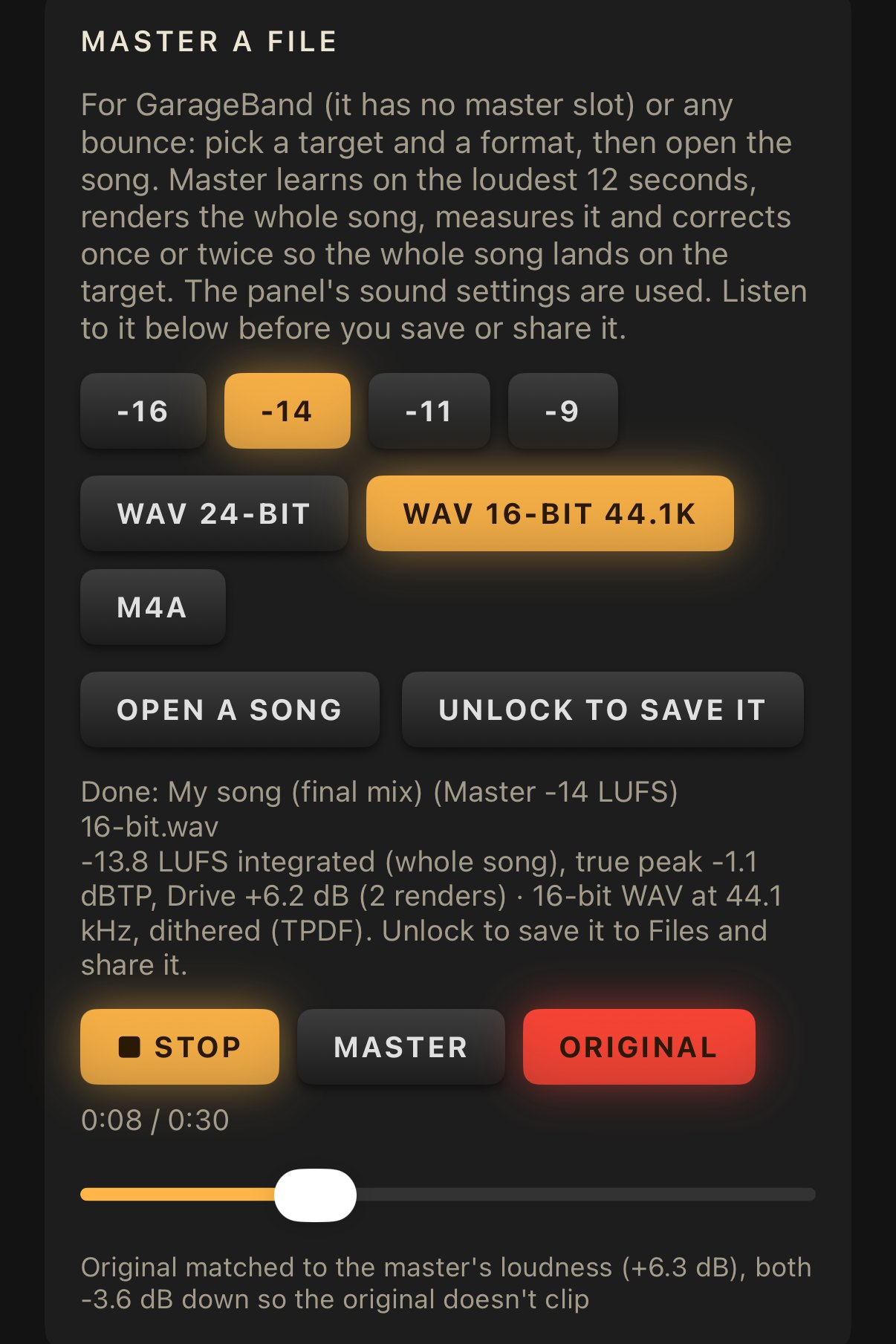
No master slot in your app (GarageBand), or a bounce from somewhere else? Open it in the Master app. Pick a target and a format (24-bit WAV, the 16-bit WAV most distributors ask for, or M4A), and Master learns on the loudest 12 seconds, renders the whole song, measures it and corrects so the whole song lands on the target. Then play it against the original at the same loudness, and save or share it.
Master or Limiter?
Both stop peaks, but they do different jobs.
- OneMove Limiter is free and goes on a bus or a track: a synth, drum or band bus, or a mix you are still working on. You set Drive and a ceiling by hand, and its screen shows every peak it caught.
- OneMove Master goes on the finished song. You pick a loudness target and it sets the gain for you, then adds the finishing stages: a character, Learned tone, Glue, Width, Balance, a level-matched Compare and file mastering.
Use both: Limiter on the busses while you mix, Master last on the main output when the song is done.
Who it's for
- Songwriters and producers on iPad and iPhone who finish songs in AUM, Loopy Pro, Logic Pro for iPad, Cubasis or GarageBand and want them to sit at a streaming loudness without a desktop.
- Live loopers: Live mode puts it on the main output with no latency, so the whole set reaches the room at one level.
- Anyone checking a bounce: OneMove Mix Scanner tells you the loudness, true peak and punch of a bounce; when the loudness or the peaks are off, Master is the tool that sets them.
Every step, host by host, and troubleshooting.
Related tools
- OneMove Limiter: free, for busses and tracks while you mix; Master is for the finished song.
- OneMove Mix Scanner: free, checks a bounce for loudness, true peak, clipping and tone, and says where.
- OneMove Vocal Console: the vocal chain, before the vocal reaches the mix.
User manual
Every control, the presets, Key Link, host setup and troubleshooting: the OneMove Master manual.
Questions
Which target should I pick?
−14 LUFS for most streaming services, −16 for quieter platforms and podcasts, −11 for a louder master and −9 for club masters. Louder than −14, Master lowers the ceiling to −2 dBTP by default.
Can I master in GarageBand on iPhone or iPad?
GarageBand has no slot for an effect on the master output. Share the song as audio to Files, open it with Master a file in the OneMove Master app, pick a target and a format (24-bit WAV, 16-bit 44.1 kHz WAV with dither, or M4A), listen against the original at the same loudness, and save it.
Will it fix a bad mix?
No. It is a finishing tool: on our 31 test mixes with deliberate faults it never made a fault worse and took off part of each, but the mix still matters most.
How much is it?
Free download with a 5-minute demo per load, with every feature. Unlock once for $14.99 (US). No subscription.
How is OneMove Master different from OneMove Limiter?
Limiter is free and goes on a bus or a track while you mix: you set Drive and a ceiling by hand, and its screen shows every peak it caught. Master goes last on the finished song: you pick a loudness target and it sets the gain for you, with a true-peak ceiling, a character, Learned tone, Glue, Width, Balance, a level-matched Compare and file mastering. Many people use both.
Is there a free trial of OneMove Master?
There's no time-limited trial. The app is a free download and every feature works: in a host, Master processes for 5 minutes each time it loads, then passes your audio through until you reload it. Bounces stay unmastered and mastered files can't be saved until you unlock. Unlock once for $14.99 (US); no subscription.
How do I master a song on iPad or iPhone to −14 LUFS?
Put OneMove Master last on the master or main output of your host (AUM, Loopy Pro, Logic Pro for iPad or Cubasis), pick −14, and play the loudest part of the song. Master learns it for 12 seconds, sets the gain and holds still; on our test mixes it landed within 0.5 LU of −14. For a finished bounce, use Master a file in the app: it measures the whole song and corrects so the whole song lands on the target.
What true-peak ceiling should a master have?
−1 dBTP is the usual streaming ceiling. For masters louder than −14 LUFS, Spotify advises −2 dBTP so lossy encodes don't clip, and Master switches its default ceiling to −2 for those targets. In our tests the output held −1.1 dBTP at a −1 ceiling on every song, character and setting.
Does OneMove Master add latency?
In Mix mode, the default, it adds 4 ms (reported to the host) and keeps the true peak under the ceiling. Live mode adds none, so you can play or sing through it in AUM or Loopy Pro; it then limits sample peaks only.