
Tune: real-time pitch correction
Module 02 of 14 · Pitch corrector
- One Move knobNatural · Hard
- LatencyStudio 20 ms · Live 0.67 ms
- CPU, iPad Air M31.3 % (Live 0.9 %)
- Default position2 of 14, after Clean
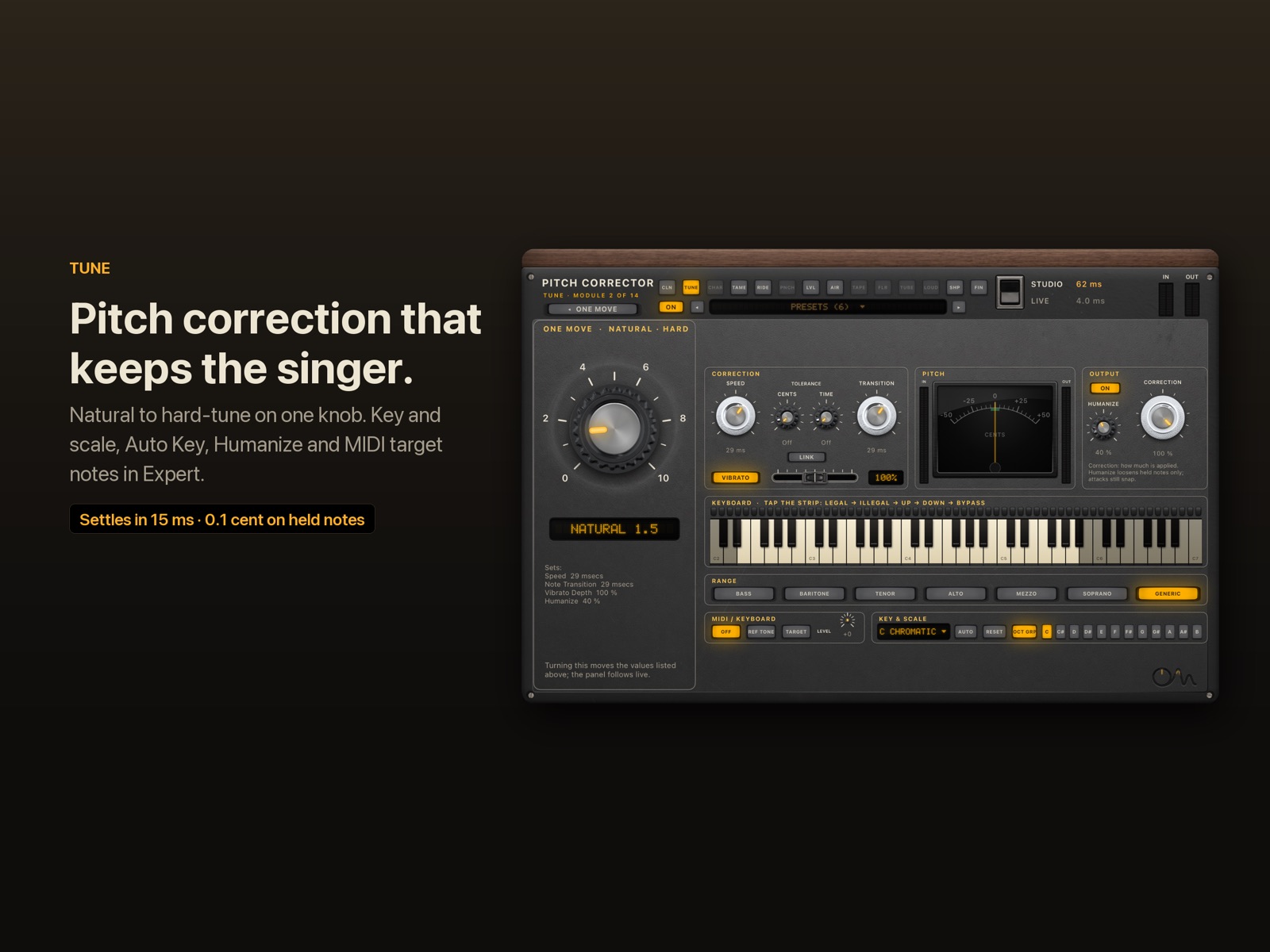
Tune corrects the pitch of a voice in real time, from a light natural touch to the hard-tuned effect, with one knob. It works in key and scale, can find the key by itself, and can follow MIDI notes. In Live mode it adds less than a millisecond of its own delay.
Hear it
Tune: Natural and Hard
Dry, then Tune on Natural (keeps the vibrato), then Hard Snap (the instant, stepped effect). Before and after are set to the same loudness, so you hear the change, not a level jump.
"Lost_Pella" by queeniemusic (ccmixter.org/files/queeniemusic/65508), licensed CC BY 3.0 (creativecommons.org/licenses/by/3.0). Excerpt, processed by OneMove Vocal Console.
The One Move: Natural · Hard
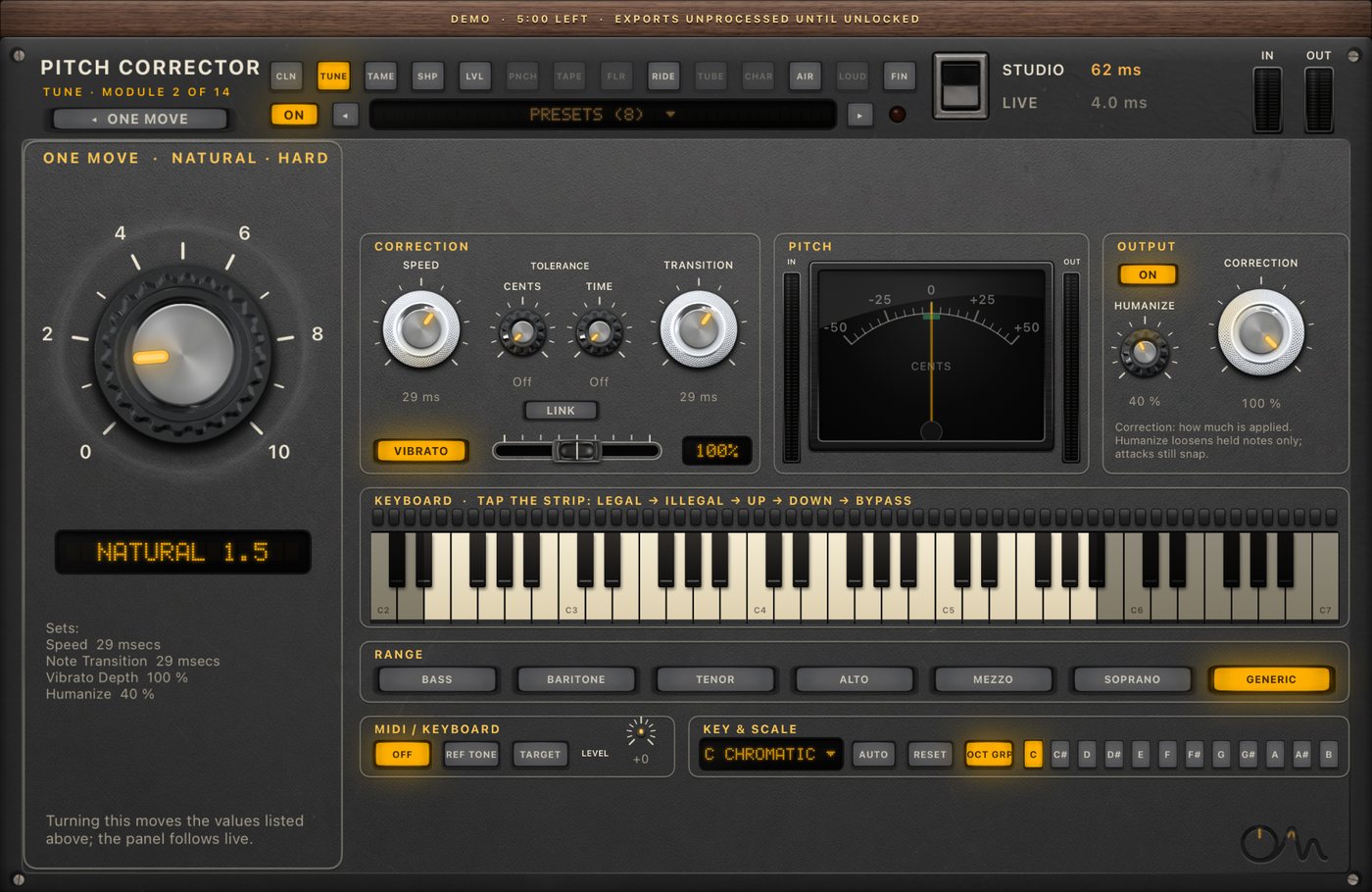
The knob runs from a natural correction on the left to a hard, robotic one on the right.
- Speed and Note Transition move together from 80 ms down to 0.1 ms, on a logarithmic scale.
- Vibrato is kept as sung until the top 40 % of the knob, then fades out toward the robotic end.
- Humanize belongs to the natural side: held notes are loosened at low settings, and it is gone by the middle.
Key and scale are set in Expert. The default is C chromatic: every note is a target.
Expert
| control | range | what it does |
|---|---|---|
| Speed | 0.1–800 ms | how fast a held note is pulled to the target |
| Note Transition | 0.1–800 ms | how fast the correction glides from one note to the next |
| Link | on / off | moves Speed and Note Transition together |
| Tolerance Cents / Time | off–40 cents / off–300 ms | leaves small or short deviations alone |
| Vibrato, Depth | on / off, 0–200 % | keeps the singer's vibrato around the corrected centre, scaled by Depth |
| Humanize | 0–100 % | slows correction on held notes only; attacks still snap |
| Correction | on / off, 1–100 % | how much of the correction is applied |
| Formant | Corrected / Non-Corrected | whether formants move with the correction |
| Reference | 415.30–466.16 Hz | the tuning of A4 (440 Hz by default), saved with the session |
| Range | Bass … Soprano, Generic | the voice range the detector searches; narrowing it avoids octave errors |
| Key / Scale | 12 keys × 16 scales, incl. User Scale | which notes are targets |
| Auto Key | on / off | listens to held notes and sets key and scale between phrases |
| Keyboard rules | Legal, Illegal, Pitch Up, Pitch Down, Bypass | per-note behaviour, with Group Octaves |
| MIDI / Keyboard | Off, Reference Tone, Target Pitch | play the target notes from MIDI or the on-screen keys |
Scales: Chromatic, Major, Natural, Harmonic and Melodic Minor, Major and Minor Pentatonic, Blues, Dorian, Phrygian, Lydian, Mixolydian, Locrian, Whole Tone, Double Harmonic and a User Scale.
Specs
| Studio | Live | |
|---|---|---|
| Hard: settles on a note from silence | 15 ms | 28 ms |
| Hard: note-to-note change | 35 ms | 46 ms |
| Steady pitch error on held notes | 0.1 cent | 0.1 cent |
| Natural: vibrato kept (50–100 cents deep) | 80–96 %, never exaggerated | 80–96 % |
| Tune's own delay | 20 ms (look-ahead for clean splices) | 0.67 ms |
| CPU, iPad Air M3, only Tune on | 1.3 % of one core | 0.9 % of one core |
| First usable pitch reading after a note starts | 15.5 ms median on 537 real onsets |
Measured November 2026 against a commercial reference tuner run on the same test signals. Method: pitch correction against a measured contract and pitch detector benchmark.
FAQ
Can Tune do the hard-tuned effect?
Yes. Turn the knob fully right: Speed and Note Transition drop to 0.1 ms and the vibrato is removed, so the voice jumps from note to note. Set the key and scale in Expert so it only lands on notes in the song.
Can I use pitch correction live, while singing?
Yes. In Live mode Tune adds 0.67 ms of its own delay, and the whole chain stays at 1.3–4 ms. A hard setting needs about 28 ms to settle on a new note in Live mode, because the detector has to hear one or two cycles of the voice first. Why that can't be instant.
Does it find the key by itself?
Yes, with Auto Key. It listens to held notes and sets the key and scale (major or natural minor) between phrases, once it is sure. On melodies with only a few distinct notes it waits rather than guess.
Can I play the target notes from a keyboard?
Yes. Set MIDI / Keyboard to Target Pitch and route MIDI to the plug-in, or use the on-screen keys. Tune then aims at the note you play, still using Speed and Note Transition.