
Ride: an automatic vocal rider
Module 09 of 14 · Vocal rider
- One Move knobRide range
- Latency0 ms
- CPU, iPad Air M31.3 %
- Default position9 of 14, after Floor
Ride moves the vocal level up and down for you, the way an engineer rides a fader, so every word sits at the same place in the mix. Feed it the music and it follows the track: louder in a dense chorus, softer in a sparse verse.
Hear it
Ride: following the music
The vocal over a simple synthetic backing that gets louder in the middle. Ride (Broad ±12 dB preset) hears the backing on its side-chain input and lifts the voice while the music is loud. Both versions are mixed with the same backing. Before and after are set to the same loudness, so you hear the change, not a level jump.
"Lost_Pella" by queeniemusic (ccmixter.org/files/queeniemusic/65508), licensed CC BY 3.0 (creativecommons.org/licenses/by/3.0). Excerpt, processed by OneMove Vocal Console. Backing: a simple synthetic chord pad made for this demo.
The One Move: Ride range
The knob sets how far the rider may move the voice: from 0 (it doesn't move) to ±12 dB, in half-decibel steps. Boosts reach the full range; cuts ease toward about three quarters of it, so a loud word never slams to the floor.
Expert
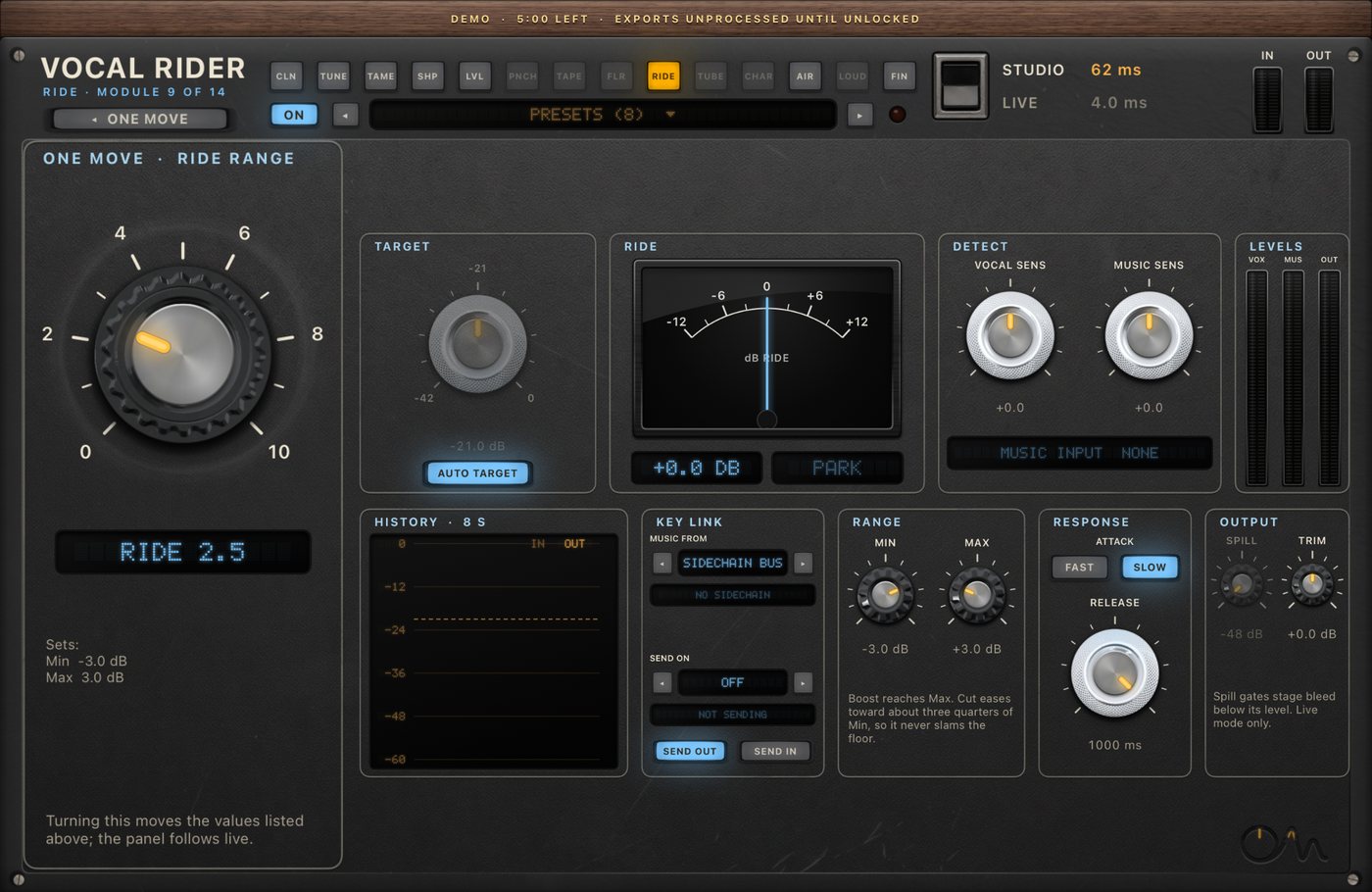
| section | controls |
|---|---|
| Target | the level the rider aims for (−42 to 0 dB, or Auto Target) |
| Ride | gain meter, and read-outs of whether it is riding the voice or parked |
| Detect | Vocal Sensitivity and Music Sensitivity (±12 dB) |
| Levels | vocal, music and output meters |
| History | an 8-second trace of what the rider did |
| Range | Min (down to −12 dB) and Max (up to +12 dB) |
| Response | Attack Fast or Slow, Release 1–1000 ms |
| Output | Spill (Live mode only: gates stage bleed below its level), output Trim |
| Key Link | Music From: the host's side-chain bus or Link A–H. Send Vocal On: Off or Link A–H |
Signal path. The rider measures a side copy of the vocal and applies the gain to the same sample, with no look-ahead. An impulse comes out on the same sample with the rider on or off.
Following the music
- Hosts with side-chain routing: send the instrumental mix to the plug-in's side-chain input ("Music") and leave Music From on Sidechain Bus.
- Hosts without it (for example Loopy Pro): use Key Link. Put a second OneMove Vocal Console on the music bus, switch its modules off, and set its Send Vocal On to a link letter, say Link A. On the vocal's instance, set Ride's Music From to Link A. The receiving panel shows LINKED when the music arrives, and the sender shows SENDING. Step-by-step: hosts and setup.
- No music at all: the rider follows the vocal alone and the panel shows MUSIC INPUT NONE.
Specs
| Latency | 0 ms: the gain lands on the same sample it was measured from |
| CPU, iPad Air M3, only Ride on | 1.3 % of one core |
| Side-chain | host side-chain bus, or Key Link channels A–H between instances |
FAQ
Does the rider replace a compressor?
No. A compressor reacts to peaks within milliseconds. The rider moves the overall level of phrases and words, more slowly, like a hand on a fader. They work best together, which is why Ride sits after the compressors.
Does it work in Loopy Pro?
Yes. Loopy Pro has no side-chain input for AUv3 effects, so use Key Link: a second instance on the music bus sends the music on a link channel, and the vocal's Ride receives it.